

If you’ve been manually copying data between apps, sending the same emails over and over, or spending hours on repetitive tasks that make you question your life choices, you’ve probably started looking into automation tools. The problem? There are dozens of platforms out there, each promising to save you time and make your workflows smoother. Two names that keep coming up are Make.com and N8N, and for good reason. They’re both powerful, they’re both popular, and they’re both completely different in how they approach automation.
Key Takeaways
- Make.com offers a more polished, user-friendly interface ideal for businesses prioritising ease of use and visual workflow design. It’s the kind of platform where you can dive in on a Monday morning and have something useful running by lunchtime, even if you’ve never touched an automation tool before.
- N8N provides greater flexibility and control as an open-source solution, perfect for technical teams wanting customisation and self-hosting. If you’ve got developers on your team or you’re comfortable getting your hands dirty with code, N8N gives you freedom that proprietary platforms simply can’t match.
- Make.com typically works better for teams without technical expertise, whilst N8N suits developers and organisations with specific security or compliance requirements. The choice often comes down to whether you value simplicity or control more highly.
- Pricing models differ significantly: Make.com uses operation-based billing, whilst N8N offers self-hosted options that can reduce costs at scale. This difference becomes more pronounced as your automation needs grow.
- Both platforms support extensive integrations, though Make.com generally has more pre-built connectors whilst N8N allows unlimited custom node development. You’re not locked into a limited ecosystem with either option, but how you extend that ecosystem varies dramatically.
Why We’re Comparing These Platforms
Automation has become essential for modern businesses, and choosing the right platform can significantly impact productivity, costs, and scalability. It’s not hyperbole to say that the automation tool you pick today might determine whether your team spends the next year celebrating efficiency gains or fighting with a platform that doesn’t quite fit.
Make.com and N8N represent two distinct approaches to workflow automation: one focuses on accessibility and ease of use, the other on flexibility and control. Make.com comes from the tradition of tools like Zapier and Integromat (which it actually evolved from), where the goal is removing friction. N8N, meanwhile, embraces the open-source philosophy where transparency and customisation matter more than polish. Both platforms have embraced AI integration in 2026, though they’ve approached it differently. Make.com offers streamlined connections to popular AI services like OpenAI and Anthropic, whilst N8N provides more granular control over AI workflows and the ability to self-host AI models if you need them.
This comparison helps you understand which philosophy aligns with your team’s technical capabilities, budget constraints, and long-term automation needs. We’re not here to crown a winner, because honestly, the “best” platform depends entirely on who you are and what you’re trying to accomplish. A three-person startup has different needs than a 500-person enterprise, and a marketing team thinks about automation differently than a development team does.
Platform Overview
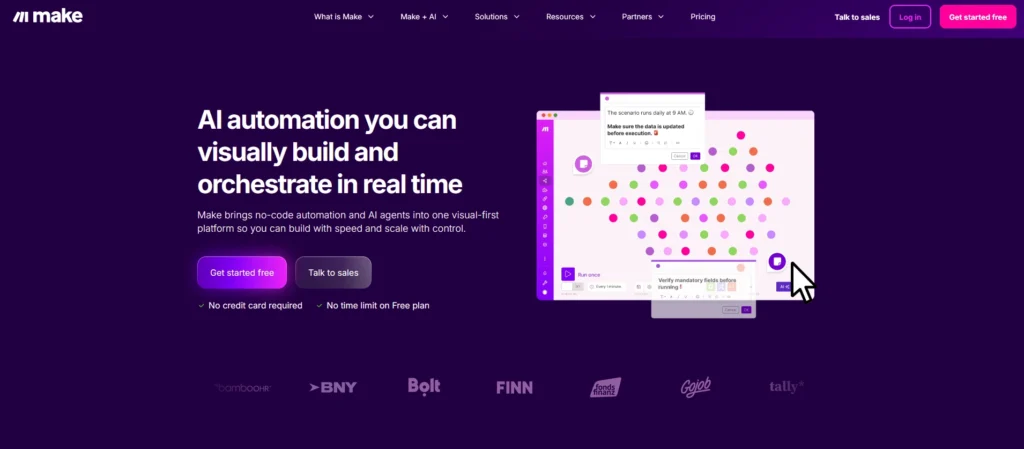
Make.com is a cloud-based automation platform that evolved from Integromat, which rebranded in 2022. It’s designed around visual scenario building, where you drag and drop modules onto a canvas and connect them to create workflows. The platform handles all the infrastructure, maintenance, and updates, so you can focus on building automations rather than managing servers.
The platform has grown considerably since its rebranding, adding more integrations and improving its interface based on user feedback. By 2026, Make.com has solidified its position as one of the leading no-code automation tools, particularly popular with agencies, marketers, and operations teams who need to connect multiple apps without writing code.
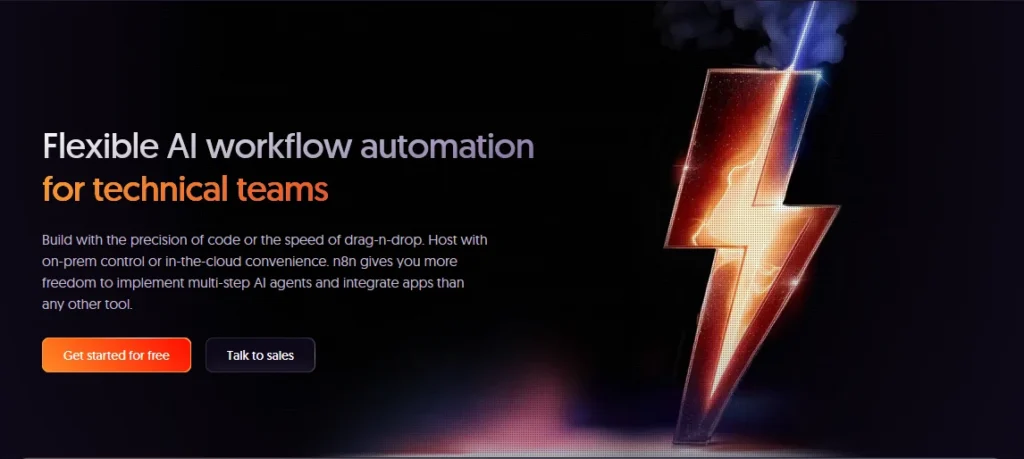
N8N takes a different approach entirely. It’s an open-source workflow automation tool that you can host yourself or run through their cloud offering. The platform gives you source-code-level control over your automations, meaning if something doesn’t work the way you want, you can modify it. That’s either liberating or terrifying depending on your technical comfort level.
N8N launched in 2019 and has built a strong community of developers who contribute nodes, share workflows, and help each other solve problems. The open-source nature means development moves quickly, with new features and integrations appearing regularly. By 2026, N8N has matured significantly whilst maintaining its core philosophy of user freedom and transparency.
User Interface and Experience
Make.com’s interface feels like it was designed by people who genuinely care about user experience. The canvas where you build workflows is spacious and intuitive, with modules that clearly show what they do. When you’re connecting apps, Make.com presents options in a logical way that doesn’t require you to understand API documentation or technical specifications.
The learning curve exists, but it’s gentle. Most users can create their first working automation within an hour of signing up. The platform includes helpful tooltips, error messages that actually make sense, and a testing environment where you can see exactly what data is flowing through each step of your workflow. This matters more than you might think, because automation debugging can be frustrating when you’re staring at cryptic error codes.
Make.com’s template library deserves mention here. Rather than starting from scratch, you can browse hundreds of pre-built scenarios that cover common use cases. Need to sync contacts between your CRM and email marketing tool? There’s probably a template for that. Want to automatically save email attachements to cloud storage? Already done. These templates aren’t perfect out of the box, but they give you a solid starting point.
N8N’s interface has improved dramatically over the past few years, but it still feels more technical. The workflow canvas is functional and lets you build complex automations, but it assumes you’re comfortable with concepts like JSON data structures and API endpoints. That’s not necessarily a criticism, it’s more about target audience.
Where N8N shines is in transparency. You can see exactly what data is moving through your workflows, inspect it in detail, and manipulate it with code if needed. For technical users, this visibility is invaluable. You’re never left wondering why something isn’t working, you can dig into the details and figure it out.
The learning curve for N8N is steeper, particularly if you’re self-hosting. You’ll need to understand at least basic concepts around servers, databases, and environment variables. Even if you use their cloud version, you’ll benefit from some technical knowledge. The documentation is comprehensive, but it’s written for people who already understand automation concepts.
Pricing and Cost Structure
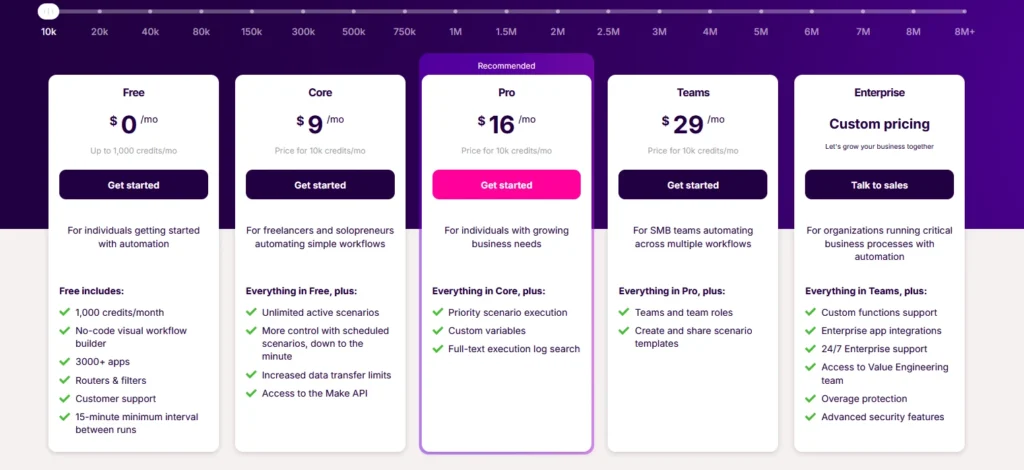
Make.com uses operation-based pricing, which can be both transparent and confusing. Every action in your workflow consumes operations, and you pay based on how many operations you use each month. The free tier gives you 1,000 operations monthly, which sounds like a lot until you realise that a single workflow run might consume 5-10 operations depending on complexity.
The paid plans start reasonably and scale up based on usage. For small teams running simple automations, the costs are managable. However, if you’re processing large volumes of data or running complex workflows frequently, the operation count adds up quickly. By 2026, Make.com has introduced more granular pricing tiers to help businesses find a plan that fits, but you still need to monitor your usage carefully.
One advantage of Make.com’s pricing is predictability. You know what you’re paying each month, and the platform won’t suddenly stop working if you exceed your limit, it’ll prompt you to upgrade. The downside is that optimising workflows to reduce operations can become its own time-consuming task.
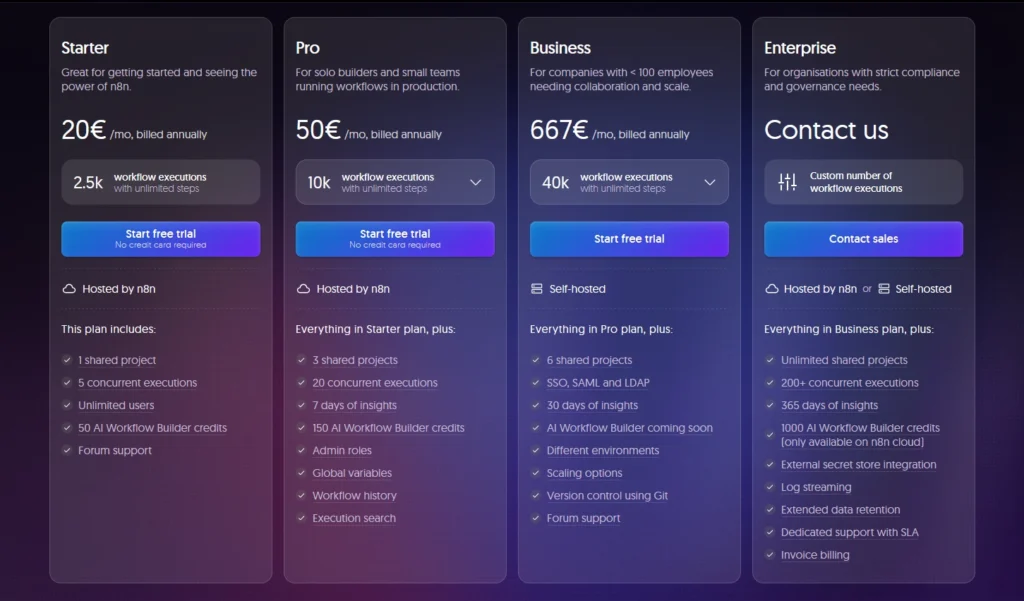
N8N’s pricing model is fundamentally different. If you self-host, the software is free. You pay for the server infrastructure, which could be as little as £10-20 monthly for a basic setup or significantly more if you need redundancy and scale. For organisations with existing infrastructure, this can represent massive savings compared to per-operation pricing.
N8N also offers a cloud version with simpler pricing based on workflow executions. This removes the hassle of managing infrastructure whilst still giving you the benefits of N8N’s flexibility. The cloud pricing is generally competitive with Make.com for similar usage levels, though direct comparisons are tricky because the platforms measure usage differently.
The total cost of ownership calculation becomes interesting at scale. A company running thousands of automations daily might spend hundreds or thousands monthly on Make.com, whilst that same volume on self-hosted N8N could cost a fraction of that amount. However, you need to factor in the cost of someone managing that infrastructure, which isn’t trivial.
Technical Capabilities
Make.com supports over 1,500 pre-built integrations as of 2026, covering most popular business applications. The platform has clearly invested in building robust connectors, and they generally work reliably. When you connect an app in Make.com, you’re typically presented with well-documented options and actions that make sense.
Where Make.com gets interesting is in data transformation. The platform includes built-in tools for manipulating data, filtering results, and applying logic without writing code. You can aggregate data, perform calculations, and format outputs using visual tools. For most use cases, this is sufficient. However, when you need to do something truly custom, you might hit the limits of what’s possible without code.
Make.com does support custom API calls and webhooks, which gives you an escape hatch for unusual requirements. You can also write custom functions using their built-in tools. The limitation is that you’re working within Make.com’s framework, which is both a constraint and a safety net.
N8N approaches integrations differently. The platform has hundreds of pre-built nodes (their term for integrations), but more importantly, it provides a framework for building your own nodes. If an app you need isn’t supported, you can create a node for it. If an existing node doesn’t do quite what you need, you can fork it and modify it.
This extensibility is N8N’s superpower. You’re not dependent on the platform developers to add features you need. The trade-off is that building custom nodes requires programming knowledge. It’s not difficult if you’re comfortable with JavaScript, but it’s definitely not a no-code experience.
N8N also excels at code-based data transformation. You can write JavaScript or Python directly in your workflows to manipulate data however you need. This makes complex data processing straightforward, though again, it requires technical skills. For teams with developers, this is liberating. For non-technical teams, it’s a barrier.
Deployment and Hosting
Make.com handles all deployment and hosting for you. You sign up, you build workflows, they run in Make.com’s cloud infrastructure. This simplicity is valuable, particularly for teams that don’t want to think about servers, uptime, or scaling. Make.com’s infrastructure is robust, with good uptime and performance.
Security and compliance are handled by Make.com’s team. They maintain SOC 2 compliance and other certifications that enterprise customers require. Your data flows through their servers, which means you need to trust their security practices. For most organisations, this is fine. For some, particularly in heavily regulated industries, it can be a concern.
N8N gives you choices. You can self-host on your own infrastructure, which means complete control over security, compliance, and data residency. Your workflow data never leaves your servers, which satisfies even strict regulatory requirements. This approach requires infrastructure knowledge but provides maximum control.
Alternatively, N8N’s cloud offering provides hosting simplicity whilst maintaining many of N8N’s advantages. You don’t manage servers, but you still get the open-source platform’s flexibility. It’s a middle ground that makes sense for teams who want N8N’s capabilities without the operational overhead.
Self-hosting N8N isn’t particularly complex if you’re comfortable with Docker or have basic DevOps experience. The platform provides documentation and community support for various deployment scenarios. You’ll need to handle backups, updates, and monitoring yourself, which is managable but requires ongoing attention.
Use Cases and Best Fits
Make.com excels for marketing teams running campaigns across multiple platforms. If you need to connect your email marketing tool to your CRM, sync contact data, trigger campaigns based on user behaviour, and track results, Make.com handles this elegantly. The visual interface makes it easy to see how data flows, and the pre-built integrations cover most marketing tools.
Agencies using multiple client systems also benefit from Make.com. You can build scenarios for different clients, manage them from one interface, and not worry about infrastructure. The ability to clone and modify scenarios speeds up client onboarding considerably.
Operations teams automating internal processes find Make.com useful because non-technical staff can understand and modify workflows. When your HR person can update an automation without calling IT, that’s valuable. The tradeoff of less flexibility is worth it for teams prioritising accessibility.
N8N suits development teams and technical organisations that need custom integrations. If you’re building a product that needs to connect to various services in specific ways, N8N lets you create exactly the integrations you need. You’re not constrained by what pre-built connectors offer.
Startups with technical founders often choose N8N because it grows with them efficiently. Starting self-hosted keeps costs low early on, and the platform scales as needs increase. The ability to modify and extend the platform means you’re never blocked by missing features.
Organisations with strict data residency requirements benefit from N8N’s self-hosting option. If your data can’t leave certain geographic regions or must stay within your infrastructure, N8N provides a path forward that cloud-only platforms can’t match.
Support and Community
Make.com provides traditional customer support through their ticketing system, with response times varying by plan level. Their documentation is comprehensive and well-organised, covering both basic and advanced topics. The quality of support has improved considerably as the platform has grown.
The Make.com community is active, with users sharing scenarios, troubleshooting problems, and suggesting improvements. The company runs webinars and provides educational resources for users at different skill levels. For a proprietary platform, they’ve done well at fostering community engagement.
N8N’s support model differs because of its open-source nature. The community forum is highly active, with responsive users and team members who genuinely help solve problems. Because the code is open, technical users can often diagnose and fix issues themselves or contribute solutions back to the project.
N8N’s documentation is thorough but technical. It assumes a baseline of technical knowledge that might be challenging for non-technical users. However, the documentation for building custom nodes and extending the platform is excellent, reflecting the developer-focused audience.
The N8N cloud offering includes professional support for paid plans, which provides a safety net for organisations that need guaranteed response times. This addresses one traditional concern about open-source platforms, lack of accountable support.
Comparison Table
| Feature | Make.com | N8N |
|---|---|---|
| Pricing Model | Operation-based, scales with usage | Free (self-hosted) or execution-based (cloud) |
| Hosting Options | Cloud only | Self-hosted or cloud |
| Technical Skill Required | Low to medium | Medium to high |
| Pre-built Integrations | 1,500+ | Hundreds, with unlimited custom options |
| Learning Curve | Gentle, intuitive | Steeper, more technical |
| Customisation | Limited to platform features | Unlimited with code access |
| Open Source | No | Yes |
| Best For | Non-technical teams, marketing, agencies | Developers, technical teams, custom needs |
| Data Control | Hosted on Make.com’s servers | Full control with self-hosting option |
| Support | Official customer support | Community + paid support for cloud |
| Code in Workflows | Limited custom functions | Full JavaScript/Python support |
| Compliance Options | SOC 2, managed by Make.com | Self-managed or cloud options |
| Scalability Costs | Increases with operations | Infrastructure costs (self-hosted) or competitive cloud pricing |
| Template Library | Extensive pre-built scenarios | Community-shared workflows |
| API Flexibility | Webhook and custom API support | Complete API control |
Making Your Choice
Choosing between Make.com and N8N ultimately depends on your team’s technical capabilities and what you value more: ease of use or flexibility. Make.com removes friction and lets you build automations quickly without technical expertise. It’s reliable, well-supported, and continuously improving. The cost scales with usage, which can become expensive but provides predictability.
N8N rewards technical investment with greater control and potentially lower costs at scale. If you have development resources and want to own your automation infrastructure, N8N provides a path that proprietary platforms can’t match. The learning curve is real, but the ceiling is higher.
For many organisations, the decision isn’t about which platform is objectively better, it’s about which better fits how you work. A marketing team without developers will probably find more success with Make.com. A technical product team building custom integrations will appreciate N8N’s flexibility.
Some teams even use both, handling simple automations in Make.com whilst using N8N for complex, custom workflows. There’s no rule saying you must choose only one tool. The automation landscape has matured enough that mixing platforms based on use case makes sense.
Whatever you choose, both platforms represent solid options in 2026’s automation landscape. Make.com has refined its offering into a polished, accessible tool that delivers real value. N8N has grown into a mature open-source platform that competes with proprietary alternatives whilst maintaining its philosophical commitments to transparency and user control. The right choice is the one that works for your team, not the one that wins in abstract comparisons.
